

Putting the I in IPS
At iPRES2019, I presented on our Integrated Preservation Suite project. This outlined an internal project we have been undertaking for several years to develop a suite of services, managed around a central web interface, for undertaking preservation planning at scale. The core components include: a Knowledge Base of technical information about file formats and software (implemented as a Neo4J graph database); a Software Repository for preserving software able to render our digital collection items; and a document repository for storing policies, preservation plans, and other preservation related documentation.
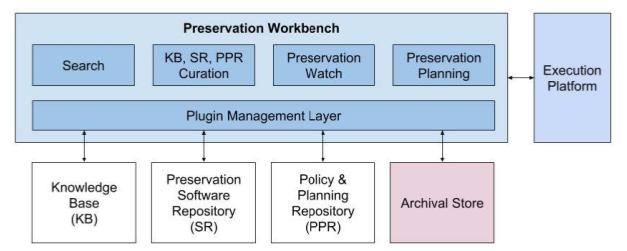
At the time of the 2019 presentation we were working towards an internal release that supported two main functions: an initial web-form based preservation planning function; and a search page for finding information about software and file formats. Those functions existed in the demonstration I gave at iPRES, but were reliant on an early, unmanaged, import of data into the Knowledge Base.
Since then — and taking into account disruption caused by Covid19 measures — we have been working hard to finalise our Knowledge Base curation process to improve the end-2-end import of data. Specifically, we want to avoid duplicating entries; imported data about the same file format should link to the same main format node in the Knowledge Base. The diagram below outlines the process we’ve implemented.
A data source adapter parses a data source (e.g. a web page) into our data model and adds data nodes into the staging area database. A person will curate the staging data into the Knowledge Base via the Workbench. They control which staging nodes are added as new nodes, which are merged with existing nodes, and which are discarded; the curation adapter implements the data management logic to make this happen. Once complete, we’ll have an updated, curated Knowledge Base.
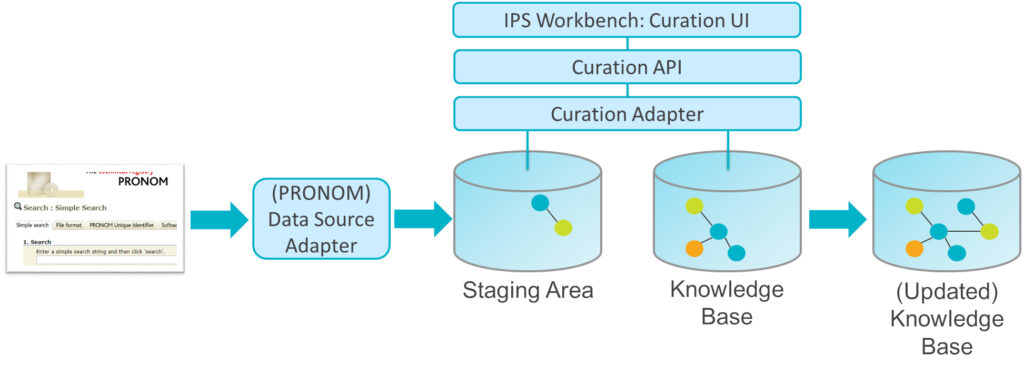
To enable this curation process to work we firstly had to extend the capabilities of our Data Management Library (DML) — a Python library used by the curation adapter to communicate with the Knowledge Base, allowing it to locate, add, and update graph nodes and relationships. The DML needed to indicate which nodes have been successfully added/updated. Following this we had to amend the curation adapter to remove successfully curated items from the staging area once they’d been copied to the Knowledge Base. We then had to implement a RESTful curation API to control the curation adapter and provide feedback to the Workbench UI. We’re now just finishing updating the Workbench UI to use the Curation API, and then we’ll move on to testing it!
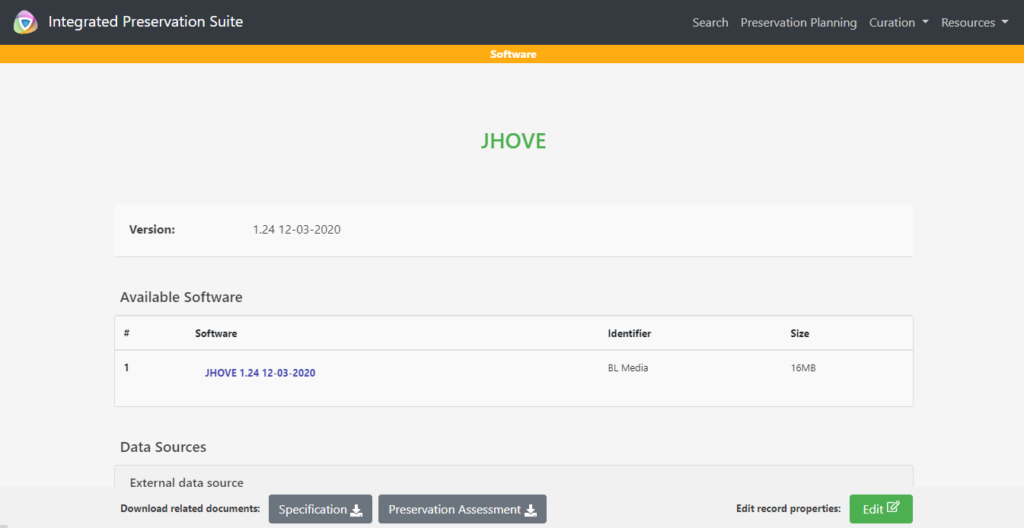
Another key area we’ve been improving is integration between the Workbench’s software search results and the Software Repository. We want preserved software to be discovered and downloaded via the Workbench (rather than separately through the Software Repository). Developments here required creating a Software Repository API and a Repository Adapter that implements that API. We also enhanced the Knowledge Base data model to capture software included in the Software Repository. We’ve now got this initial capability working, allowing the Workbench to indicate preserved software and to provide download links to them.
Once those efforts are complete, our next development phase will look at improving the preservation planning process to make better use of the Knowledge Base. For example, how can we improve generation of preservation plan options based on collection, risk, file format or software information? We’ll also look to develop new data source adapters, improve existing ones, and start to populate our Knowledge Base in a curated fashion. Be on the lookout for a future webinar on our progress!
 Using large sheets of paper stuck to the meeting room walls, we created a primary board with 3 main columns: To Do, Doing, Done. After introductory presentations recapping the purpose of the workshop and the main goals, participants were urged to consider tasks they needed to do and to write them on sticky notes, whilst further presentations were given about specific activities that needed doing (e.g., generating microsite documentation for each tool). This worked really well as it got participants thinking about and writing down what they needed to do whilst discussions were happening.
 We never had any logic or consistency in which tools had their own board and which didn’t, which resulted in some confusion; a few times I overheard questions such as “why does this tool have its own board?” to which there was no obvious answer. In many ways these smaller boards acted as swim lanes for those tools, the lanes just happened to be separated out into their own boards. Separate boards highlight the work on a specific tool/topic, but perhaps unnecessarily isolate that work from the rest. If a clear distinction between work item “topics” is needed, different coloured sticky notes could always be used instead (this wasn’t the case for us though), but caution should be used to avoid making it too complex (e.g. through use of too many colours).
 The first day started by reviewing the existing scenarios. Plenty of excellent work has gone on across the project, and much of this is driven and directed by content holders who express their needs and assess solutions through the various