Issue with System font in RTF documents
As preservation team of the National Archives of the Netherlands, we received a question. We want to ask you if you can help us find more knowledge about this issue. Perhaps you have encountered it before. You may even have a solution.
And: (how) would you document this issue, knowledge and/or solution in metadata?
Render issue
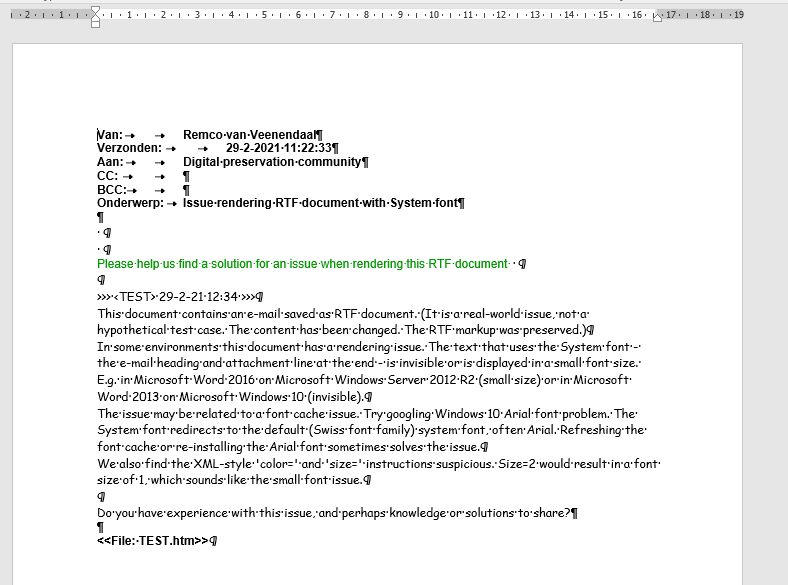
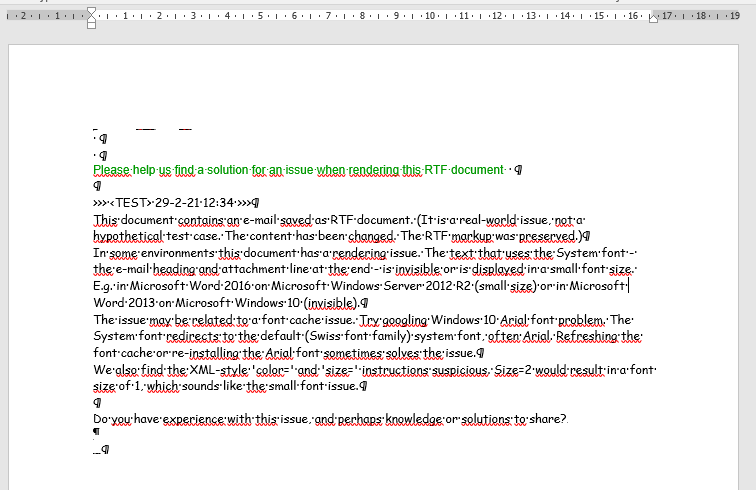
The issue is that some combinations of Microsoft Windows and Microsoft Word render some RTF text in the System font incorrect or not at all, see the area above the green text in the screen shots.
The RTF documents are e-mails exported as RTF, stored in an information system and downloaded for viewing in Microsoft Word. On initial display, the documents are rendered as expected. But as soon as you e.g. double-click the text in the System font, the issue occurs.
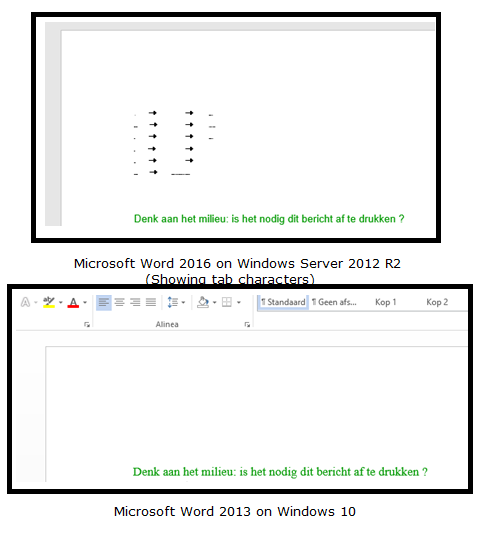
We were unable to reproduce this issue in various other environments, ranging from other Windows and Word combinations to other document viewers, both on and offline. But our test was too ad hoc to conclude that the issue is limited to the environments mentioned. Or that it is an issue specific to those environments.
Possible explanations?
In cooperation with the colleagues who sent us the question, we came up with possible explanations for this issue.
One explanation is that the default system font might be corrupt or missing. The RTF instruction to use the System font is in fact an instruction to use the default system font. In this case the default Swiss font family font, Arial. When our colleagues investigated their font list and cache after googling ‘Windows 10 Arial font problem‘, and refreshed their font cache or re-installed the Arial font, the issue was sometimes – not always – solved. Also, using the Arial font directly (and not via an instruction to use the System font), did not seem to result in the issue.
Another explanation stems from the RTF markup itself. The document has the following RTF header (where we changed some values to make different fonts stand out more; business e-mails would e.g. not use the Comic Sans MS font):
{\rtf1\ansi\deff0{\fonttbl{\f0\fswiss\fprq2\fcharset0 System;}{\f1\fnil Comic Sans MS;}{\f2\fnil Verdana color=#990099 size=2;}}This header includes the XML-style “color=” and “size=” parameters. The size= parameter is suspicious. It would result in a font size of 1. The \fs command’s parameter is in half-points. Interpreting a font defintion with size=2 might also result in setting the font size to 1. That sounds like the small font issue. But it is defined for a different font and the color= parameter is not interpreted, so we think this is probably a red herring.
Your knowledge, experiences or solutions?
- We want to ask you, if you have encountered this issue before. Perhaps you have experiences or knowledge to share, or documentation to point to. You might even have a solution for us.
- We are also considering to document this issue in metadata. Perhaps, to keep it manageable, not at the individual file level, but at some higher aggregation. Would you document a possible issue like this? Where? How?
You can send your reponses to me: remco.van.veenendaal@nationaalarchief.nl.
The RTF document
Feel free to save the following code block as an RTF document (a text document with a .rtf extension) and test if you can reproduce the problem in your environment.
{\rtf1\ansi\deff0{\fonttbl{\f0\fswiss\fprq2\fcharset0 System;}{\f1\fnil Comic Sans MS;}{\f2\fnil Verdana color=#990099 size=2;}}
{\colortbl ;\red0\green153\blue0;}
\viewkind4\uc1\pard\lang1043\b\f0\fs20 Van:\tab\tab Remco van Veenendaal
\par Verzonden:\tab\tab 29-2-2021 11:22:33
\par Aan:\tab\tab Digital preservation community
\par CC:\tab\tab
\par BCC:\tab\tab
\par Onderwerp:\tab Issue rendering RTF document with System font
\par
\par \b0\f1\fs20
\par
\par \cf1\f2 Please help us find a solution for an issue when rendering this RTF document \cf0\f1
\par
\par >>> <TEST> 29-2-21 12:34 >>>
\par This document contains an e-mail saved as RTF document. (It is a real-world issue, not a hypothetical test case. The content has been changed. The RTF markup was preserved.)
\par In some environments this document has a rendering issue. The text that uses the System font - the e-mail heading and attachment line at the end - is invisible or is displayed in a small font size. E.g. in Microsoft Word 2016 on Microsoft Windows Server 2012 R2 (small size) or in Microsoft Word 2013 on Microsoft Windows 10 (invisible).
\par The issue may be related to a font cache issue. Try googling Windows 10 Arial font problem. The System font redirects to the default (Swiss font family) system font, often Arial. Refreshing the font cache or re-installing the Arial font sometimes solves the issue.
\par We also find the XML-style 'color=' and 'size=' instructions suspicious. Size=2 would result in a font size of 1, which sounds like the small font issue.
\par
\par Do you have experience with this issue, and perhaps knowledge or solutions to share?
\b\f0\fs20
\par
\par <<File: TEST.htm>>\b0\f1\fs20
\par }
Update 2021-03-08, in response to the comments: below are two screenshots that my colleagues made of the document. First the normal situation, then the issue situation. (Please note that Word was configured to display some markup.)